
Themeora: Widgets & Wallpaper
Kayle AI SolutionPersonalization
4.712.00 Reviews
- Version
- 6
- Installs
- 50.00K
- Age Rating
- Everyone
Screenshots
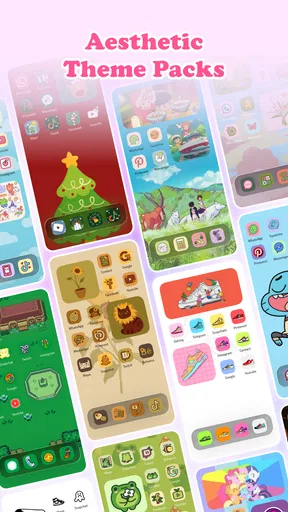
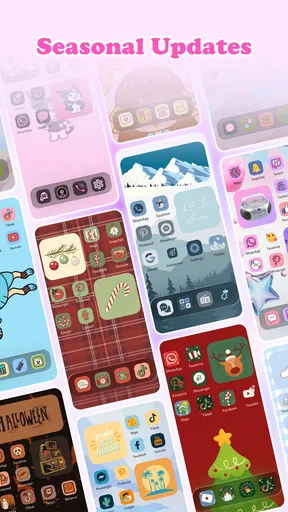

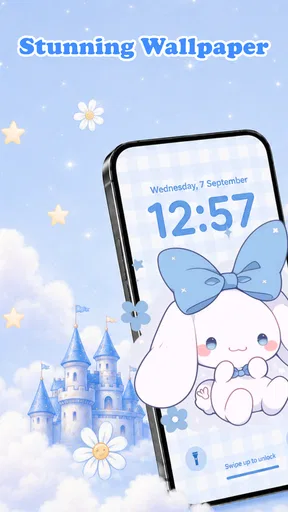

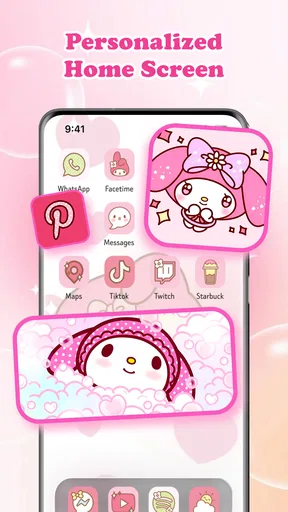
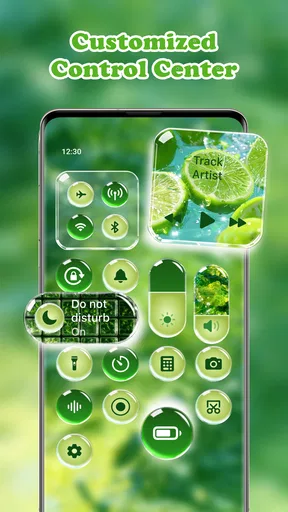
Our Review of Themeora: Widgets & Wallpaper
 Analysis by Appyee
I approached Themeora: Widgets & Wallpaper as a practical personalization tool rather than a simple collection of decorative images. Its appeal is clear: it brings themes, widgets, wallpapers, and app icons into one place so I can give an Android home screen a more consistent look without assembling every piece separately. After spending time with it, my main impression is that it works best for people who enjoy refining the small details of their phone, but it is less convincing for anyone who wants a completely effortless setup with no browsing or adjustment.
That distinction matters. A wallpaper by itself can change the mood of a device, but a coordinated home screen usually depends on several elements working together. Themeora, developed by Kayle AI Solution, is built around that broader makeover. It belongs to the personalization category, is free to install, and is suitable for Everyone. The current release is version 6, with Android 7.0 or later required, so it remains accessible to many older devices as well as newer phones.
How Themeora feels when you use it
The first thing I noticed is that the app encourages a complete visual decision instead of treating each customization as an isolated choice. I could think about the wallpaper, icons, and widgets as parts of one home-screen style. That makes the process more enjoyable than opening a separate wallpaper app, then hunting through another service for icons, and finally searching elsewhere for a widget that does not clash with either.
The store summary presents the app as a way to customize a home screen with themes, widgets, wallpapers, and app icons. In practice, that combination is the reason to try it. The individual ingredients are familiar, but their value increases when they are considered together. A muted wallpaper can make bright icons look out of place; a dramatic icon set can make a minimal widget feel unfinished. Themeora gives me a single workspace for thinking through those relationships.
I also like that this kind of customization can be approached in stages. I do not have to redesign the entire phone in one sitting. A useful first step is choosing a wallpaper that matches the lighting conditions where I normally use my phone. From there, I can select icons with enough contrast to remain recognizable, then add only the widgets that genuinely help. This avoids the common mistake of filling the screen with attractive elements that make everyday navigation slower.
For example, imagine checking a phone during a busy morning. A dense, high-contrast theme may look impressive in a screenshot but become tiring when notifications, calendar entries, and app labels compete for attention. I found that a calmer background and a restrained icon style are usually more practical. The customization tools are most valuable when they support that kind of decision rather than encouraging decoration for its own sake.
The strongest part is the all-in-one workflow
The app’s strongest argument is convenience. Traditional personalization often involves switching between several apps and trying to make their visual styles agree. That approach can work, but it creates friction: files may be stored in different places, icon packs may follow different design rules, and widgets may use colors that cannot be adjusted to match the rest of the screen. Themeora’s unified focus makes the process easier to organize.
This is particularly useful when I want a seasonal or situational refresh. Instead of replacing one wallpaper and leaving everything else untouched, I can treat the whole home screen as a small visual project. A work-focused arrangement might use a subdued background, simple icons, and a compact widget area. A personal setup could be more expressive. The benefit is not merely having more choices; it is being able to make those choices with a consistent goal.
Another practical strength is that the app lowers the barrier for people who do not normally customize their devices. Experienced Android users may already know how to combine launchers, icon packs, widgets, and image folders. For everyone else, that process can feel unnecessarily technical. Themeora is more approachable because its purpose is immediately understandable: browse a style, consider the supporting elements, and shape the home screen around it.
That simplicity does not make the result automatically good, though. I still had to make decisions about spacing, readability, and how much information belonged on the first page. The app can provide the ingredients, but it cannot know whether I prefer a clean screen or a highly functional dashboard. I consider that a positive limitation: it leaves room for personal taste rather than pretending one arrangement suits everybody.
Small decisions make a bigger difference than more downloads
One of the more useful lessons from using the app is that customization quality depends less on collecting many themes and more on editing with discipline. I would start with the app icons I use most often, not every icon on the phone. If the frequently opened apps are easy to recognize, the home screen remains usable even when less common icons do not match perfectly.
I would also keep the first page focused. A widget can be attractive, but it takes valuable space and may duplicate information already available through notifications or a quick settings panel. Placing one meaningful widget where my thumb naturally reaches is more effective than adding several that I rarely consult. This is an important trade-off with any personalization app: visual completeness can work against speed.
A second useful approach is to judge a wallpaper in real use instead of only in the browsing view. Details that look subtle in a preview may make text labels difficult to read once icons are placed over them. I found it sensible to check the upper and lower areas of an image separately, because those are often where status information, dock icons, or other interface elements appear. A beautiful image is not automatically a good home-screen background.
The same thinking applies to icon style. A monochrome or highly stylized set may produce a polished appearance, but familiar color cues can be helpful when I am opening an app quickly. I would choose a more decorative style for a secondary page and keep the primary page easier to scan. That two-page workflow gives the phone personality without turning every basic action into a visual search.
Where the experience creates friction
The main weakness is that personalization can become a browsing task without a clear stopping point. When an app brings together themes, wallpapers, widgets, and icons, the number of possible combinations can make it harder to commit to one. I sometimes found myself evaluating small visual differences instead of asking whether a change actually improved the way I used the phone.
There is also a gap between selecting a design and living with it. A theme may look coherent at first, but daily use exposes problems that a preview cannot solve: icons may be too similar, a widget may occupy more room than expected, or a background may reduce legibility at certain times of day. Themeora helps with the creative side of the process, but I still needed to test the finished arrangement and be willing to undo choices that looked better than they functioned.
Another consideration is cost. The app is free, which makes it easy to explore, but it includes optional in-app purchases ranging from $3.49 to $37.99 per item. That does not make the free starting point unattractive, yet it does mean I would approach premium-looking collections with a clear budget in mind. For someone who only wants an occasional wallpaper, paying for individual extras may be harder to justify than using a basic free alternative.
This is where Themeora may not be the best choice. If I only need a single background, the phone’s built-in wallpaper picker or a focused wallpaper app may be quicker. If I want deep control over gestures, page behavior, app drawers, and layout rules, a dedicated launcher is likely a better fit. Themeora makes more sense between those extremes: it is for visual coordination, not for replacing every part of the Android interface.
Compatibility is another practical question. Android 7.0 or later is required, so anyone using an older device cannot rely on it. On supported phones, the final result can still depend on the device’s launcher and system behavior. I would therefore treat the app as the design source for the home screen rather than assume that every phone will present a theme in exactly the same way. Users who care about pixel-perfect consistency across several devices may prefer tools designed specifically around their launcher.
Who will get the most from it
I think Themeora is a strong match for people who enjoy changing their phone’s appearance but do not want to manage a collection of unrelated customization tools. It is especially suitable for someone who has a clear visual preference—minimal, colorful, atmospheric, or playful—and wants the wallpaper, widget area, and icons to support that preference together.
It is also useful for people who treat their home screen as a practical workspace. A carefully chosen layout can separate work and personal routines, make commonly used apps easier to find, or create a calmer environment for reading and communication. The app does not need to produce an elaborate makeover to be worthwhile. A small change in background, icon contrast, and widget placement can make a familiar phone feel more comfortable.
Beginners may appreciate the guided nature of the concept, while experienced users can use it as a source of visual direction. I would not describe it as a replacement for every advanced Android customization method, but it can shorten the creative phase. Someone who already knows exactly which launcher settings and icon packs they want may find the app unnecessary; someone who wants inspiration and a more unified starting point is more likely to enjoy it.
The audience numbers suggest that it has already attracted meaningful interest, with over fifty thousand installs and a 4.7 average from around seven hundred ratings. I would read that as encouraging rather than conclusive. A strong average can indicate that the central idea works for its intended audience, but personalization is subjective. A person who dislikes changing layouts may have a very different reaction from someone who regularly refreshes a phone’s appearance.
Questions I would consider before installing
One practical question is whether the app is suitable for an older Android phone. The answer is yes if the device runs Android 7.0 or newer. That broad requirement is helpful, although the smoothness of browsing and the final appearance can still vary with the phone and its launcher. I would check the device’s available storage and current home-screen setup before beginning a large redesign, especially on an older handset.
Another question is whether I have to pay to try it. No: the app is free to install. Optional purchases are available, with individual items priced from $3.49 to $37.99. I would begin with the free material and decide whether the app’s workflow genuinely improves my phone before considering anything extra. That approach keeps the experiment low-risk and prevents the visual novelty from pushing me into an unnecessary purchase.
It is also worth asking whether Themeora is better than using separate apps. For a single wallpaper, probably not. For a coordinated refresh involving several visual elements, I prefer the all-in-one approach because it reduces the effort of matching styles. Separate tools remain preferable when I want specialized controls, a particular launcher ecosystem, or a very large library focused on one type of customization.
Finally, I would ask whether a complete theme is always the right answer. In my experience, no. The most successful setup may use a Themeora wallpaper with a small number of carefully chosen icons and no additional widget at all. The app is valuable even when I use only part of its toolkit, because the important result is a home screen that feels intentional and remains easy to use.
My verdict after living with the customization
Themeora: Widgets & Wallpaper succeeds because it treats personalization as a coordinated task. Its best quality is not any single decorative element, but the way it encourages me to consider the relationship between the background, icons, widgets, and everyday navigation. Kayle AI Solution has created a free personalization app that is approachable for newcomers while still giving more experienced users a convenient place to begin a visual redesign.
The limitations are equally clear. Browsing can become distracting, premium purchases require restraint, and the app cannot replace a dedicated launcher for deeper system-level control. The final quality also depends on my choices: a crowded screen remains crowded, even when every element comes from a polished theme. I would skip it if I only wanted one quick wallpaper or if I expected extensive launcher customization.
For anyone who wants a more unified Android home screen without piecing together several unrelated tools, I think it is worth trying. My recommendation is to begin with one purposeful change, test it during a normal day, and add only the elements that improve recognition or convenience. Used that way, Themeora feels less like a gallery to collect from and more like a practical design kit. Its real strength is helping a phone look personal without forcing personalization to become a full-time project.
Verdict
Strengths of Themeora: Widgets & Wallpaper
- Large collection of widgets and wallpapers for personalizing your home screen.
- Supports matching wallpaper and widget styles for a coordinated appearance.
- Regularly updated content keeps the customization library feeling fresh.
- Preview tools make it easier to check designs before applying them.
- Offers options for creating a more distinctive look than default system themes.
Limitations of Themeora: Widgets & Wallpaper
- Some premium designs and features may require a subscription or purchase.
- High-resolution wallpapers can consume considerable storage and mobile data.
- Certain widgets may need extra setup or permissions to work correctly.
- Battery use may increase when using animated or frequently updating widgets.
- Compatibility and layout quality can vary across Android devices and launchers.
Other Releases by Kayle AI Solution
View All
AI Video Generator - AI Photo
Video Players & Editors4.8
Similar Picks in This Category
View All
Microsoft SwiftKey AI Keyboard
SwiftKey4.3

Wallpapers
Google LLC4.1

Zedge™ Wallpapers & Ringtones
Zedge4.7

Yandex Browser with Alice AI
Direct Cursus Computer Systems Trading LLC4.3

Ringtone Maker:create ringtone
Big Bang Inc.4.7

Fonts Keyboard
Fonts Keyboard3.9
Frequently Asked Questions
What is Themeora: Widgets & Wallpaper?
Themeora: Widgets & Wallpaper is a personalization app designed to help you refresh the appearance of your phone’s home and lock screens. It typically combines wallpaper collections, themed visual styles, and customizable widgets in one place. After installing it, users can browse different aesthetics, preview how elements look together, and create a more coordinated setup without manually searching for every wallpaper or widget separately.
What customization options does Themeora offer?
Themeora focuses on combining visual backgrounds with widgets and themed layouts, so the available customization may include wallpapers, colors, icons, clock styles, calendars, weather information, and other home-screen elements. The exact options can vary by device and operating system. Before downloading, users should check the app’s current store listing because some features, collections, or advanced customization tools may require a subscription or in-app purchase.
Is Themeora: Widgets & Wallpaper free to use?
The app may be available to download at no initial cost, but free access does not necessarily mean that every design or feature is unlocked. Personalization apps commonly provide a selection of free wallpapers and widgets while reserving premium packs, exclusive themes, or unlimited access for subscribers. Review the pricing page carefully during setup, especially the trial duration, renewal terms, and cancellation procedure before confirming any purchase.
Will Themeora work on both Android and iPhone?
Compatibility depends on the version of Themeora available for each platform and on the requirements of your specific device. Wallpaper installation is generally straightforward, but widgets and themed layouts can behave differently on Android and iOS because each system handles home-screen customization in its own way. Check the official Google Play or App Store listing for supported versions, device requirements, and any platform-specific limitations.
Does Themeora affect battery life or phone performance?
Static wallpapers and simple widgets should normally have a limited effect on performance, but animated backgrounds, frequently updating weather widgets, and other live elements may use additional battery, memory, or mobile data. On older phones, a heavily customized home screen can also feel less responsive. If battery consumption increases after installation, try disabling animations, reducing widget updates, or using fewer active widgets.
